


Beacon Game Launcher
4.3170.00 Reviews
App Specs
- Version
- 1.9.0
- Updated On
- License
- $2.99
- Downloads
- 10,000+
- Developer
- NERDS TAKE OVER
- Categories
- Personalization
- Platform
- Android
Screenshots
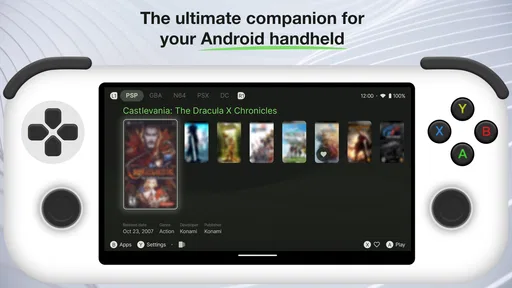
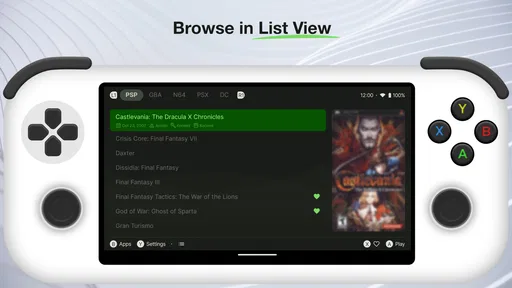
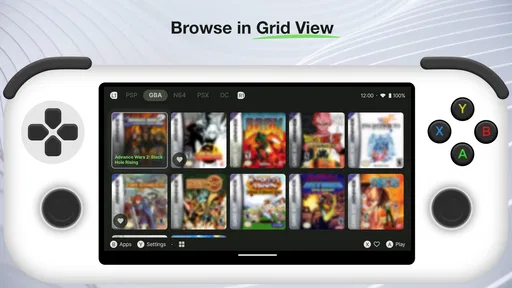
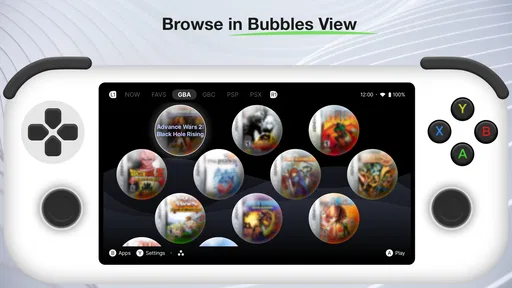
 Analysis by AppCompare
If you’re like me and love diving into a variety of mobile games but hate the clutter of multiple launchers, the Beacon Game Launcher might just be your new best friend. I took it for a spin to see if it lives up to the hype, and let me tell you, managing my game library has never been so seamless.
That tidy-library idea is the part I would focus on before installing. A launcher is useful only if it makes getting to the games you already play simpler; it does not replace those games or make every part of using a phone feel different. I’d approach Beacon as a dedicated place to organize and open mobile games, rather than as a promise that the games themselves will behave differently.
Before you begin: check the fit
Beacon Game Launcher is a paid personalization app from NERDS TAKE OVER, priced at $2.99. It is rated Everyone, has a 4.3 average from around 970 ratings, and has passed 10,000 installs. It was released on August 24, 2023, and version 1.8.19 supports Android 7.0 and later. Those details make it worth checking your device’s Android version and whether you actually want a separate launcher before paying for it.
The main practical question is not whether you play games, but whether you want a distinct place for them. If you usually open one or two favorites from your home screen, a folder or the phone’s app drawer may already be enough. If your installed games are scattered across several screens and you switch among them often, a dedicated hub has a clearer purpose. I would decide based on that everyday friction rather than on the word “launcher” alone.
It also helps to set expectations about what a launcher can change. It can organize access to apps; it cannot make a demanding game less demanding simply by presenting its icon in a different place. When a game stutters, crashes, or drains the battery, the cause may lie in the game or the device rather than in the screen used to open it. Keeping that distinction in mind avoids expecting a library organizer to solve unrelated performance problems.
Streamlined Game Management
One of the first things you'll notice about the Beacon Game Launcher is its intuitive design. It feels like the developers really put themselves in the shoes of a gamer. The interface is sleek and easy to navigate, which is a breath of fresh air compared to some of the bulky launchers out there.
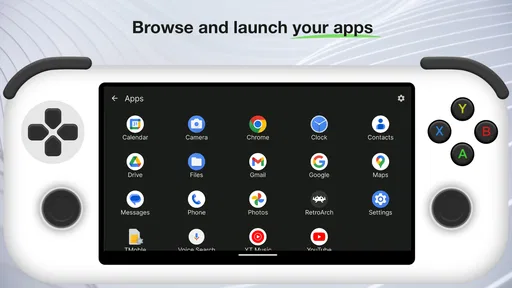
Upon opening the app, your games are displayed in a neat, organized grid. It automatically scans your device and populates the launcher with all your installed games. No need to manually add anything—huge time saver! Plus, it updates automatically whenever you download a new game, which is a feature I didn’t know I needed until I had it.
Worth Reading Before You Choose

EA SPORTS FC Mobile 26 Is a Bigger Football Game, but It Takes Time

Flipboard Shows What News Apps Must Do Beyond the Feed

Switching to Android Auto Means Rethinking Your Driving Routine

Google Calendar Makes a Crowded Week Easier to Manage

Ludo King Makes the Most of the Minutes Between Plans

Baby Panda World Brings Quick Play to Modern Phones, but Its Game Library Feels Busy
Customization Galore
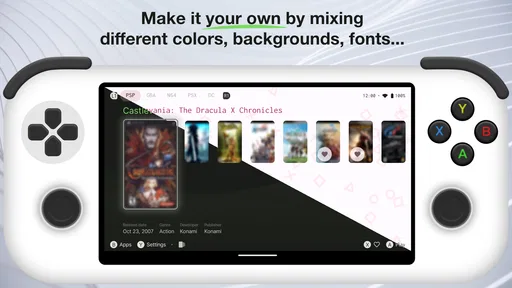
Let’s talk customization. One of the standout features is the ability to personalize your game hub. You can rearrange your game icons, create folders, and even assign custom labels. I went a bit wild with this feature—who knew organizing games could be so satisfying?
You can also change themes to match your vibe. Whether you’re feeling dark mode or want something brighter, there’s an option for you. It's these little touches that make using the launcher a pleasure rather than a chore.
The organization becomes more useful when it reflects how you actually choose a game. I’d group titles by the situation I reach for them in—something brief for a short wait, a longer game for a quiet evening, or multiplayer options when friends are available. That is more actionable than building folders around genres if I tend to pick based on time or company. Custom labels can make those groupings easier to recognize at a glance.
One trade-off with any customizable hub is the effort required to keep the arrangement meaningful. If you install games frequently, an automatically updated library saves the routine of adding each one, but new icons can still make a carefully arranged layout feel less deliberate. I’d treat the grid as a quick-access shelf, not a project that needs constant perfection. A small number of useful folders is likely to stay helpful longer than a complex filing system.
Performance Boost
Now, a pretty interface is nice, but what about performance? I was pleasantly surprised to find that the Beacon Game Launcher actually optimizes your device for gaming. It closes unnecessary background apps and boosts RAM to ensure that your games run smoothly. I noticed a significant reduction in lag, especially with more demanding games.
It also includes a handy performance tracker, so you can monitor your device’s temperature and battery usage while gaming. This feature is a game changer (pun intended) for those long gaming sessions!
I would be cautious about treating a smoother session as proof that the launcher is responsible. Phone performance can vary with the game, how long the device has been in use, battery condition, available storage, and other apps running at the same time. If a game feels slow, compare like with like: try the same activity under similar conditions and pay attention to whether the problem happens repeatedly. A tracker is most useful as a way to notice patterns, not as a guarantee that every slowdown has a single fix.
For an everyday example, imagine opening a game during a commute and then returning to it at home later. The organized entry point can save a few taps when you want to pick a title quickly, while the temperature and battery information can help you decide whether to keep playing or take a break. That is a modest but realistic benefit: better visibility and easier access, not a substitute for sensible charging habits or a cure for a game that is poorly suited to your device.
Social Integration
For those who love to share their gaming achievements, the Beacon Game Launcher offers seamless social media integration. You can easily share your high scores or connect with friends directly through the app. It’s all about keeping the community vibe strong, and I’m all for it.
The app also features a built-in chat system, so you can coordinate with friends or join gaming groups. I found this particularly useful for multiplayer games where communication is key.
Social tools may be a bonus if your gaming routine already involves coordinating with friends, but they are not the reason I would choose a launcher over a basic folder. If you mainly play solo, the library and customization are the more relevant parts. If you already handle group conversations elsewhere, keeping those conversations in a familiar place may be simpler than switching between another chat area and the game. The value depends on whether those social features fit your existing habits.
Compared with the usual alternatives, Beacon sits between a plain app drawer and a broader home-screen replacement. The app drawer is simpler and needs no separate game organization; a normal folder gives quick access with almost no setup. A launcher built around games is more appealing when you want the games gathered, arranged, and presented as their own collection. I would skip Beacon if changing the way the whole phone feels is your main goal, or if your existing home-screen setup already gets you into games without friction.
When opening a game does not go smoothly
If a game is missing from the library, I would first check whether it is installed on the device and then reopen the launcher to see whether the list refreshes. If it still does not appear, restarting the phone is a sensible basic check before changing several settings at once. For an icon that appears but does not open the game, try launching that game from the usual app drawer. This helps separate a launcher shortcut problem from an issue with the game itself.
When a game misbehaves after opening, note whether the same thing happens when started outside Beacon. If it does, the launcher is less likely to be the source of the problem. If only the launcher route fails, restarting the app and checking that you are using the current version are reasonable first steps. I would avoid assuming that a library refresh or a theme change will fix crashes, network trouble, or performance issues inside a game.
Version 1.8.19 is the current version, and Android 7.0 is the minimum operating system requirement. If your phone is older than that, this is not the right choice for it. If it meets the requirement but the app feels awkward, give the basic library a chance before spending time on elaborate folders: first see whether finding and opening your games is easier. That simple test tells you more about the app’s value than an elaborate setup does.
Conclusion: Is It Worth It?
In a word: absolutely. The Beacon Game Launcher is a well-rounded tool that enhances the mobile gaming experience. It combines practicality with a bit of flair, making it both functional and fun to use. It’s like having a personal assistant for your games, and who wouldn’t want that?
Whether you’re a casual gamer or someone who spends hours on mobile games, this launcher is worth checking out. It simplifies game management, improves performance, and even adds a touch of personalization to your gaming routine. So, if you’re tired of juggling multiple launchers or just want to streamline your gaming experience, give the Beacon Game Launcher a try. You might just wonder how you ever gamed without it!
My practical recommendation is narrower: it makes the most sense for someone who has enough games to benefit from a dedicated collection and enjoys arranging that collection. The folders, labels, and themes give that person room to make the hub feel personal, while the automatic library organization reduces routine sorting. Someone who owns only a few games, prefers the default app drawer, or expects a launcher to fix every game’s performance should probably keep the simpler setup instead.
Because it costs $2.99, I would make the decision based on the organizing experience rather than on the promise of a dramatic technical upgrade. The Everyone age rating makes it suitable for a broad audience, but suitability is not the same as usefulness: the key question is whether you will open this hub often enough for its structure to matter. If you do, Beacon can give your games a more intentional home; if not, the phone’s existing tools are likely to be enough.
Pros
- Intuitive interface for easy navigation.
- Wide selection of games available.
- Customizable user profiles.
- Seamless game updates and patches.
- Integrated chat for social interaction.
Cons
- Occasional lag during peak hours.
- Limited parental control features.
- Requires robust internet connection.
- Some games have in-app purchases.
- Ads can be intrusive at times.
FAQs for Beacon Game Launcher
What platforms does Beacon Game Launcher support?
Beacon Game Launcher is designed to cater to both Android and iOS users, providing a seamless gaming experience across these platforms. It ensures that players can access their favorite games regardless of their device type, offering a unified interface for easy game management and updates.
Is Beacon Game Launcher free to use?
Yes, Beacon Game Launcher is free to download and use. However, while the launcher itself is free, some games available through the platform may have in-app purchases or premium features that users can choose to buy for an enhanced gaming experience.
Does Beacon Game Launcher support cloud saving?
Beacon Game Launcher offers cloud saving capabilities, allowing users to save their progress and access it across multiple devices. This feature ensures that players won't lose their game progress, enabling seamless transitions between different devices without any hassle.
How does Beacon Game Launcher ensure game security?
Beacon Game Launcher prioritizes user security by implementing rigorous security protocols and regular updates. It scans games for malware and ensures compliance with platform guidelines, providing a safe environment for downloading and playing games securely.
What kind of games can I find on Beacon Game Launcher?
Beacon Game Launcher features a diverse library of games, ranging from casual puzzles to intensive strategy games. It caters to various gaming preferences, ensuring that players of all interests can find something engaging. Regularly updated, the library offers both popular titles and exclusive games.


